12 Modeling Species Transport
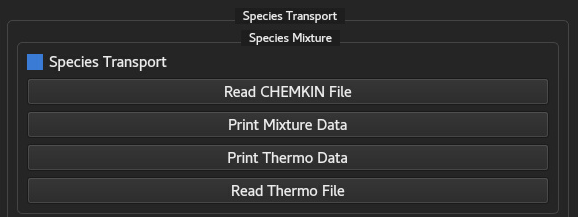
This chapter describes the configuration, data verification utilities, and boundary setup for multi-component species transport and volumetric reactions in NeuralFlow. The GUIX-H panel shown in Figure 12.1 allows users to load kinetics/thermo databases, execute diagnostic checks, select reaction rate models, and set species transport parameters.
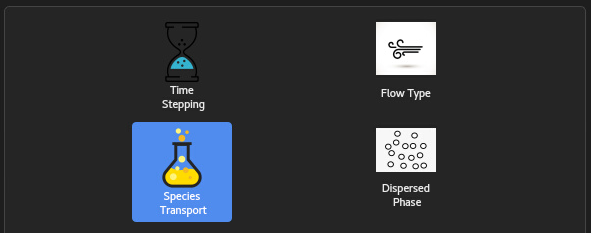
To activate species transport calculations in the solver, check the Species Transport checkbox appeared at the interface, when Species Transport Tool is clicked. When unchecked, species transport equations are bypassed.
12.1 Reading CHEMKIN File
NeuralFlow reads detailed chemical kinetic mechanisms formatted according to standard ASCII CHEMKIN conventions. The mechanism file specifies the species list, atomic compositions, reaction pathways, and empirical Arrhenius rate parameters.
12.1.1 Mechanism Parsing and Verification
Clicking the Read CHEMKIN File button opens a file
browser to load the mechanism file (.inp or
.dat). The parser extracts three core data blocks:
ELEMENTS: Fundamental chemical elements (e.g.,
H, O, N, C) used for element mass conservation checks across reaction steps.SPECIES: Transportable gaseous chemical components (
). Each species is assigned an internal index, molar mass ( ), and spatial transport equation. REACTIONS: Elementary forward, reversible, third-body, and pressure-dependent reaction pathways (
).
12.1.2 Diagnostic Mechanism Printing
Users can verify the imported mechanism by clicking Print Mechanism Data. This action outputs a comprehensive summary to the console/log file, including:
Total number of species and elementary reactions.
Verified element balance for each reaction step.
Summary of Arrhenius parameters (
) and third-body efficiencies.
12.2 Reading Thermochemical Table File
Thermodynamic species properties—such as temperature-dependent
specific heat (
12.2.1 Thermochemical Data Import
Clicking the Read Thermo File button prompts the
user to select the thermodynamic database (e.g.,
thermo.dat). NeuralFlow parses the 7-coefficient polynomial sets
for both low- and high-temperature ranges (split at
12.2.2 Thermochemical Diagnostic Utilities
Two diagnostic functions are available to inspect the parsed property values prior to running a simulation:
Print Thermo Data: Logs the raw NASA polynomial coefficients (
), valid temperature ranges ( ), and molecular weights for all parsed species. Print Mixture Data: Evaluates and outputs reference state mixture properties (e.g., mean mixture molecular weight
, reference enthalpy, density, and Wilke transport properties) based on current species mass fraction distributions.
12.3 Volumetric Reactions
The Volumetric Reactions group box controls the
chemical source term evaluation (
No Reaction: Deactivates all chemical reaction source terms (
). This mode is suitable for non-reacting multi-component mixing, tracer studies, or passive scalar transport. Laminar Finite Rate: Computes chemical source terms directly using laminar Arrhenius reaction kinetics, neglecting turbulent fluctuations. Ideal for laminar flames, shock tube simulations, or micro-reactors.
Turbulent Finite Rate: Incorporates turbulence-chemistry interaction (TCI) to model finite-rate kinetics in turbulent flows (e.g., Eddy Dissipation Concept or turbulent combustion closure).
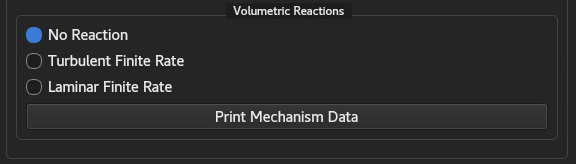
Note / Implementation Status: Reaction kinetic models are currently not implemented in the active solver version. Therefore, users must strictly ensure that only the No Reaction radio button is selected. Selecting finite-rate reaction options will not compute reaction terms in the current release.
12.4 Boundary Conditions for Species
Species boundary conditions define the mass fraction distributions
(
12.4.1 Inlet Boundaries
At inflow boundaries, users can specify species composition via
either mass fractions (
12.4.2 Outlet and Pressure Boundaries
At standard outflow faces, species mass fractions are zero-gradient
extrapolated along outgoing streamlines (
12.4.3 Wall Boundary Formulations
Near solid walls, species flux behavior depends on surface reactivity and porosity:
Inert / Non-Reacting Wall (Impermeable) [Default]: Assumes zero net mass flux for all species normal to the wall face:
where is the molecular mass diffusivity and is the turbulent Schmidt number ( ). Catalytic / Surface Reacting Wall [Currently Unavailable]: Balances near-wall species diffusive flux against heterogenous surface reaction rates (
): Transpiration / Blowing Wall [Currently Unavailable]: Models surface gas injection (e.g., film cooling or thermal ablation) by imposing a non-zero normal wall mass flux (
) with specified injected species composition .
Model Availability: Due to the absence of reaction kinetic models and surface mass injection formulations in the active solver release, Catalytic / Surface Reacting Wall and Transpiration / Blowing Wall boundary formulations are currently not available. All solid wall boundaries must be configured using the default Inert / Non-Reacting Wall boundary condition.
Setup Requirement: Species concentration initialization must be specified for each individual cell zone using the I.C. Tool interface. For multi-zone or multi-region domains, each cell zone can be initialized with distinct species mass/mole fraction values (e.g., fuel-rich regions, ambient air zones, or inert purging zones) to ensure correct initial state definition and numerical stability.